A
App Reviewer
SureDeploy Tools App Reviewer
1

Check my apps

Drop your Intune Discovered apps CSV, start the scan, then save your link to come back later.

Drop your CSV here
or browse files · .csv only
Add a CSV to enable this action.
2

Review my apps

Already ran a scan? Paste your scan link to load the results.

Paste the link you saved from a previous scan.

How to export the CSV from Intune

Follow these steps in the Microsoft Intune admin centre to get the file you need.

1

Open Apps

In the Intune admin centre, select Apps from the left navigation.
Apps menu item in Intune
2

Select Monitor

Under Apps, expand Monitor.
Monitor menu item
3

Open Discovered apps

Choose Discovered apps — the inventory of managed and unmanaged apps on corporate devices.
Discovered apps link
4

Export aggregate

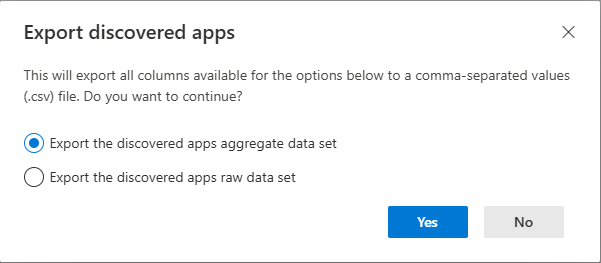
Click Export, choose aggregate data set, then Yes. Upload that CSV here.
Export discovered apps dialog with aggregate selected